Vmake Labs: create viral video
- 4.1
- Rating
- 5.00M
- Installs
- Free
- Price

 Analysis by App-foxy
I spent time with Vmake: AI Talking Video Editor as a mobile video tool, and my first impression was that it is trying to cover the whole path from raw clip to publishable social content. Instead of focusing only on cutting footage, it brings together background removal, AI templates, thumbnail creation, captions, image and video enhancement, and an AI assistant-style feature called Agent. That broad approach makes it more interesting than a basic trimming app, although it also means the experience can feel busier than a simple editor.
Vmake is developed by Starii Tech Pty Ltd and sits in the video players and editors category. It is free to install, with optional in-app purchases ranging from $1.99 to $209.99 per item. That difference matters: I would treat the free installation as a way to explore the workflow, not as proof that every tool or export option is included without payment. The app is rated for Everyone, runs on Android 8.0 or later, and its current version is 3.2.0.
How Vmake fits into a real editing workflow
The most useful way to understand Vmake is as a production shortcut for people who need presentable content quickly. A small seller photographing a product, a creator preparing a short talking clip, or a social media manager turning one recording into several posts may appreciate having visual cleanup and publishing assets in one place. I found the combination more practical than the name alone suggests because thumbnails and captions solve different parts of the same problem: getting a video ready to be watched and understood.
You May Also Like

 Blood Strike: 2.5 Anniversary
Blood Strike’s Loadouts Turn Every Drop Into a Tactical Gamble
A close look at Blood Strike’s custom loadouts: how fast access to signature weapons reshapes its battle royale rhythm, rewards preparation, and narrows the gap between fights.

 Pandora - Music & Podcasts
Pandora’s Music Is Easy to Start, but Harder to Recover
Pandora’s strength is its low-effort path from a seed to a station. Its weak spot is how much confidence it asks you to place in connection, setup, and quiet recovery.

 8 Ball Pool
 Is Built on Rivalries, Rematches, and Routine
A close look at the rivalries, rematches, shared routines, and unanswered safety questions that turn a quick pool match into a persistent mobile community.

 Samsung Music
’s Quiet Strength Is Playing What You Already Own
Its reach comes less from spectacle than from dependable access to a personal library. That simplicity is both the app’s strongest retention engine and its ceiling.

 AccuWeather: Weather Radar
AccuWeather Review: A Quick, Clear Forecast for Everyday Decisions
For everyday plans, the best forecast is the one you can understand quickly. AccuWeather makes rain timing, radar, and local conditions easy to act on, with a few trade-offs.

 Hill Climb Racing
Why Hill Climb Racing Still Turns Crashes Into One More Run
A tiny car, a bumpy hill and one more upgrade: Hill Climb Racing keeps resurfacing because its simple chaos makes every near-miss feel personal.
More From Our News Desk



Traditional mobile editors usually make you assemble the result manually. You import a clip, trim it, place text, adjust the frame, and then search for another tool if the background looks distracting or the image needs improvement. Vmake takes a more assisted route. Its advertised tools point toward a workflow where the app helps with the repetitive visual work, while you decide whether the result still looks like your content rather than an automatic template.
That distinction is important. AI editing is most valuable when it removes tedious steps, not when it replaces judgement. I would use Vmake to speed up an ordinary clip, then inspect the subject edges, captions, framing, and thumbnail before sharing anything. The time saved is real only if the final review is part of the process.
Starting with a product or talking clip
A realistic everyday example would be a small online seller recording a product demonstration at home. The original footage might have a cluttered room behind it, uneven lighting, and a spoken explanation that needs captions for silent viewing. In that situation, the background remover can help isolate the item or speaker, the enhancer can make the footage more presentable, and captions can make the message accessible in a feed where many people watch without sound.
I would not apply every tool automatically. Removing a background can make a product look cleaner, but an overly artificial edge can be more distracting than the original room. Enhancement can also push a casual recording toward an unnatural look if used too aggressively. My preferred workflow is to make one change at a time, compare the result with the source, and keep the version that still looks believable.
The same principle applies to AI templates. Templates are useful when the goal is speed or when I need a starting point for pacing and layout. They are less useful when the content depends on a distinctive visual identity. A template may organize a short clip well, but it should not dictate the message, especially for a business that wants every post to feel recognizably its own.
Captions are more than decoration
Captions are one of the features I would use most consistently. They can help viewers follow a talking video in noisy places, make a clip easier to understand with the sound off, and support people who are deaf or hard of hearing. They also expose weaknesses in the original recording: unclear speech, names, product terms, and fast sentences become obvious once they appear as text.
That is why I would always proofread automatically generated captions before publishing. A single incorrect word can change the meaning of a sales message or make a speaker look careless. I would also check line breaks and timing rather than accepting the first result. Captions should support the person speaking, not cover their face or compete with the product being shown.
For short social clips, concise speech usually produces a better caption result than trying to fit a long explanation into a tiny video. Vmake can help with the presentation, but it cannot fix a message that is unfocused. I get more value from it when I decide the main point before editing and use the app to make that point easier to see.
Thumbnails deserve their own attention
The thumbnail feature is a useful addition because the image people see before opening a video is not always the best frame from the recording. A speaker may blink, a product may be partly hidden, or the most informative moment may be visually dull. Creating a separate thumbnail lets me choose a clearer promise for the video instead of leaving that choice to an automatic preview frame.
I would treat the thumbnail as a small editorial task rather than a decorative afterthought. It should show the subject quickly, leave enough space for readable text if text is used, and match what the video actually delivers. A dramatic image that has little connection to the clip may attract a tap but disappoint the viewer. Vmake is more valuable here when it helps produce a truthful, legible preview.
One practical trade-off is consistency. If I use a different template and visual treatment for every post, the individual thumbnails may look polished but the overall feed can become messy. I would save a simple personal style and use the app’s templates as variations around it, not as a replacement for a recognizable format.
Background removal and enhancement need restraint
Background removal is especially appealing for product photos, portraits, catalog-style clips, and quick promotional material. It can turn an ordinary room into a cleaner visual setting and make it easier to place a subject against a more suitable background. However, fine details such as hair, transparent objects, thin straps, and motion can be difficult for any automated cutout. I would inspect the outline at full size before relying on it for a storefront image or professional campaign.
The enhancer is similarly useful when a clip is almost good enough but lacks clarity or visual balance. I see it as a finishing tool, not a substitute for recording in decent light. If the source is badly framed, heavily blurred, or poorly exposed, enhancement may make the flaws more noticeable rather than truly repairing them. Recording a steadier, better-lit original will usually produce a stronger result than trying to rescue everything afterward.
This is one of the less obvious lessons of an AI editor: the more dramatic the correction, the more carefully I need to compare it with the source. A clean result is not automatically a natural result. For personal videos, I prefer a modest improvement. For a product image, I may accept a stronger change if the item remains accurate in shape and color.
Agent and the appeal of guided editing
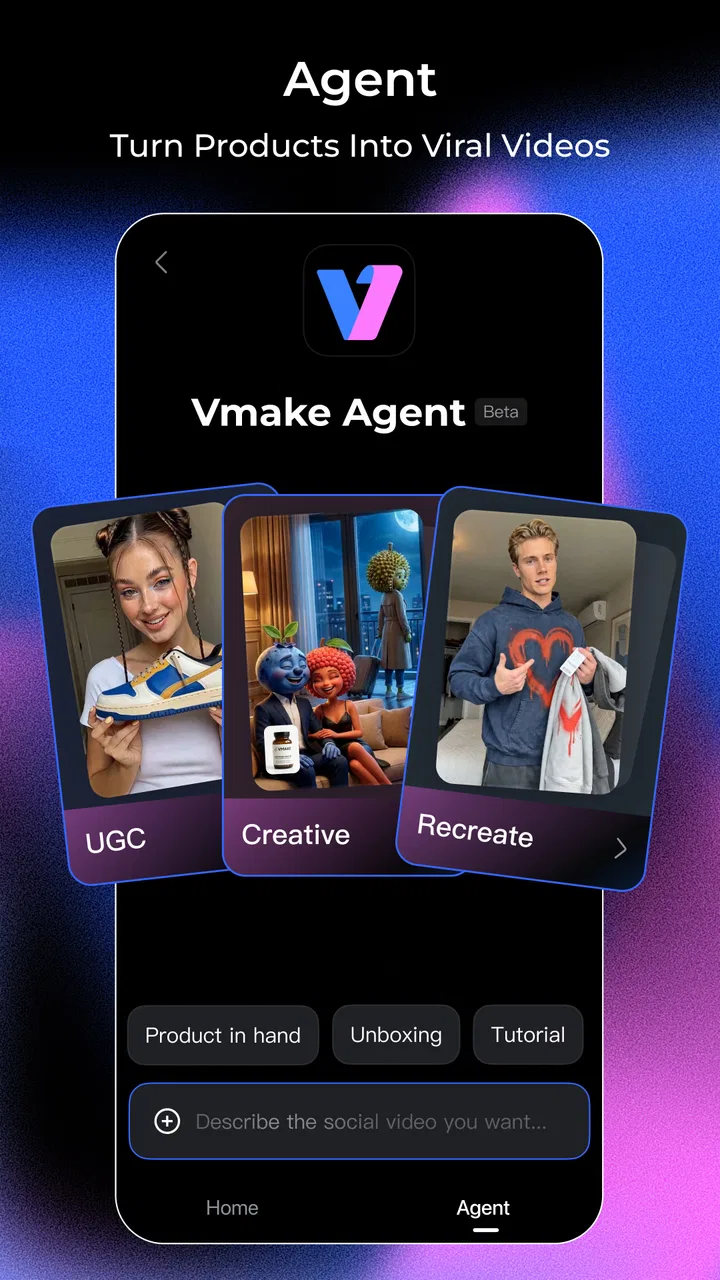
Vmake also includes a feature called Agent, which suggests a more guided approach to creating content. I see that as potentially helpful for someone who knows the outcome they want but does not know which editing step should come first. Instead of exploring every control, a user can begin with the intended task and use the assistant-style workflow as a route through the app.
The trade-off with guided tools is control. A conventional editor gives me direct access to individual decisions, while an assisted system may encourage a faster but less predictable process. I would use Agent for a first pass, then switch to manual checking wherever the result affects branding, product accuracy, or the meaning of spoken content. That combination gives speed without handing over the final judgement.
For an experienced editor who already has a preferred timeline app, the Agent feature may not be enough reason to change tools. Its appeal is strongest for people who edit occasionally, want help choosing a starting point, or would rather describe a desired result than build every element from scratch.
What the free access means in practice
Because Vmake is free to install but also offers in-app purchases, I would begin by testing the exact workflow I need before committing to any paid option. The free entry point makes it reasonable to import a sample clip, explore the editor, examine the available tools, and see whether the process feels comfortable. I would not assume that a tool shown in the interface has unlimited use or that every output condition is identical across features.
The listed purchase range stretches from $1.99 to $209.99 per item, so the potential cost difference is substantial. That makes it especially important to judge value by repeated use rather than by the presence of a single attractive feature. If I only edit one casual clip every few months, paying for a broad toolkit may not make sense. If I regularly prepare product visuals, captions, thumbnails, and short videos, the convenience can be more meaningful.
I also would not describe the app as automatically cheap simply because the download is free. Free access has value when it lets me complete enough of my normal workflow without friction. Paid value begins when a purchase removes a limitation that matters to me repeatedly. Since different users need different combinations of tools, my advice is to test a representative project rather than judging the app from a quick tour.
Where it beats ordinary alternatives
Compared with a basic phone gallery editor, Vmake offers a much wider creative path. A gallery editor is excellent for trimming, rotating, and making quick corrections, but it is not designed around a complete content package with captions, thumbnails, background work, AI templates, and enhancement. If I need only to shorten a family clip, Vmake may be more than I need. If I need to prepare a social post from raw material, its wider scope is more relevant.
Compared with a conventional timeline editor, Vmake appears better suited to assisted production than detailed manual construction. A timeline-focused app is usually the better choice when I need precise cuts, layered audio decisions, complex sequencing, or fine control over every transition. Vmake makes more sense when the goal is a clean result quickly and the source material is relatively straightforward.
It also occupies a different space from a dedicated design application. A design tool may offer stronger control over brand layouts, typography, and reusable visual systems, while Vmake connects those presentation needs directly to video work. I would choose Vmake for speed across several content tasks, but I would look elsewhere when a campaign depends on exact brand specifications or elaborate graphic composition.
The strongest comparison is not “AI versus manual.” It is convenience versus precision. Vmake can reduce the number of separate apps and repetitive steps, while specialist tools may still win for demanding projects. I would happily use Vmake for a short product demonstration, a talking-head update, or a quick promotional asset. I would not make it my only editor for a long-form project that requires detailed timeline control.
Who is likely to get the most value
I think Vmake is a good fit for creators who publish frequently but do not want to spend a long time learning advanced editing software. It also suits small businesses that need presentable product content without building a large production setup. The combination of background removal, enhancement, captions, and thumbnails addresses several common obstacles at once, especially when one person is recording, editing, and publishing.
It can also help a social media assistant who receives ordinary footage from someone else and needs to turn it into a clearer post. In that case, the app’s assisted tools may reduce repetitive cleanup. The important condition is that the user still has enough time to check the output. Fast automation is not a benefit if nobody reviews the captions or notices a poor cutout.
Casual users may enjoy it when they want more than the built-in editor but less complexity than professional software. Someone making occasional travel clips, simple announcements, or short personal videos can explore the tools without needing to build a sophisticated editing system. The Everyone age rating also makes the app broadly approachable, although the usefulness of its features will depend more on the project than on technical ability.
Who should choose another tool
I would skip Vmake if my main requirement is detailed, manual editing. If I need frame-accurate pacing, extensive audio mixing, complex layers, or a carefully controlled long-form timeline, a specialist editor is likely to be a better home. Vmake’s broad AI-assisted focus is not a weakness for its intended audience, but it is not the same as deep production control.
I would also hesitate if I dislike checking automated results. Captions can need correction, cutouts can need inspection, and enhancement can require restraint. Anyone expecting a single tap to produce a finished professional asset may become frustrated. The app can shorten the routine work, but it does not remove the responsibility to judge whether the result is accurate and appropriate.
Finally, I would be cautious about paying for a wide set of tools if I only need one simple function. A free basic editor may be enough for trimming, and a dedicated caption or design tool may be better value for a very specific workflow. Vmake earns its place when I use several parts of the toolkit together, not merely because it contains many buttons.
My final recommendation
Vmake is a capable choice for people who want an assisted route from ordinary footage to social-ready content. I like that its focus extends beyond cutting video: captions help with silent viewing, thumbnails improve presentation, background removal cleans up distracting scenes, and enhancement can give usable material a more finished appearance. Agent and AI templates add speed for users who prefer guidance over a blank timeline.
My recommendation is to start with one realistic project rather than trying every feature at once. Record or import a clip you genuinely plan to publish, create captions, test a restrained enhancement, inspect the subject edges, and make a thumbnail that accurately represents the result. That process will tell you more about the app’s value than browsing its feature list.
With a 4.3 average from around 13 thousand ratings and more than a million installs, it has clearly found an audience, but those figures should not replace personal testing. I see Vmake as most valuable when it replaces several small editing tasks in one workflow. If that is what you need, the free installation is a sensible starting point. If you need deep timeline precision or only basic trimming, I would choose a more focused alternative instead.
For me, the verdict is positive but practical: use Vmake for speed, then keep your own eye on the final result. It is not a magic substitute for good footage or editorial judgement, yet it can make the everyday work of preparing short videos noticeably easier. That balance is where Vmake: AI Talking Video Editor delivers its clearest value.
FAQs for Vmake Labs: create viral video
01What is Vmake: AI Talking Video Editor and how does it work?
Vmake: AI Talking Video Editor is an innovative app that uses artificial intelligence to create talking videos. Users can input text, and the app generates a video where a digital avatar or uploaded image speaks the text. This is achieved through advanced lip-sync technology, making it a powerful tool for content creators.
02Is Vmake compatible with both Android and iOS devices?
Yes, Vmake is available for both Android and iOS platforms. The app is designed to work seamlessly across different devices, ensuring that users can create and edit videos smoothly, whether they're using a smartphone or tablet. Always check the app’s compatibility with your device version before downloading.
03What features does Vmake offer to enhance video creation?
Vmake offers a range of features such as customizable avatars, multiple voice options, and real-time editing tools. Users can add background music, adjust video speeds, and apply various filters to enhance their videos. The AI-driven lip-sync technology ensures synchronized and realistic video output, catering to diverse creative needs.
04Are there any in-app purchases or subscriptions required in Vmake?
Vmake offers a free version with basic features, but to unlock advanced functionalities, users may need to make in-app purchases or subscribe to premium plans. These purchases allow access to exclusive avatars, voices, and additional editing tools, providing a more enriched user experience for professional content creation.
05How secure is my data when using Vmake?
Vmake prioritizes user privacy and data security. The app uses robust encryption protocols to safeguard user data and videos. It adheres to stringent privacy policies, ensuring that personal information and content are not shared without consent. Users can review the privacy policy for detailed information on data handling practices.
Pros
- User-friendly interface for easy navigation.
- Wide range of AI effects and filters.
- Quick export with high-quality options.
- Supports multiple video formats.
- Regular updates with new features.
Cons
- Limited free version features.
- Occasional in-app purchase prompts.
- Requires stable internet connection.
- Heavy on battery usage.
- Some features need improvement.

Vmake Labs: create viral video
Gallery